

XHTLLO
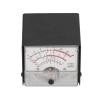
XHTLLO SWR Power Meter with External Display, High Performance Metal Case Cover for FT857 FT897, Accurate Measurement and Easy Ope ion(White)
£57.89
£96.48
-
 Order within to get between
 -
 Tracked Shipping on All Orders
-
 14-Day Returns
- Secure Payments
-
 24/7 Customer Support
Description
- CLEAR DISPLAY: Get precise readings of automatic degree control voltage, modulation degree, standing waves ratio, and power supply voltage with the clear display of this SWR power meter.
- HIGH PERFORMANCE: Designed with fine workmanship, this power meter delivers high performance and exceptional stability, ensuring reliable ope ion in various conditions.
- ALUMINUM ALLOY SHELL: The aluminum alloy shell enhances durability and texture, providing excellent protection against falls and collisions for longlasting use.
- EASY TO OPERATE: Operating this external SWR power meter is a breeze with simple instructions, making it accessible for users of all levels of expertise.
- ACCURATE MEASUREMENT: Benefit from accurate measurement and clear readings with the standing waves ratio receive display meter, offering practicality and accuracy for your needs.
Specification:
Item Type: SWR Power Meter
Material: Aluminum alloy + ABS
Purpose: Power meter
Receive Display Settings:
1. Press[FUNC]key to enter the setting menu and enable the extended menu.
2. Turn[SELECT]to call up the setup menu item No-060 [MTR ARX SEL].
3. Rotate[DIAL]to Select External Instrument Display:
SIG: Input signal strength display
CTR: Discriminator Center Meter
VLT: Battery voltage
N/A: Blank
FS: Buckle on the meter 1mA full scale output signal to calibrate the standard external meter
OFF: Turn off the meter.
4. Press[FUNC]key to save the setting and exit the setting menu.
Transmit Display Settings:
1. Press[FUNC]key to enter the setting menu and enable the extended menu.
2. Turn[SELECT] to call up the setup menu item No-061 [MTR ATX SEL].
3. Rotate[DIAL]to Select External Instrument Display:
PWR: Transmit power display
ALC: Automatic level control voltage display
MOD: Modulation level display
SWR: SWR display
VLT: Display power supply voltage
N/A: Blank
OFF: Turn off the meter.
The Calibration Method Is As Follows:
1. Press[FUNC]key to enter the setting menu and enable the extended menu.
2. Turn[SELECT]to call up the setup menu item No-060 [MTR ARX SEL].
3. Rotate[DIAL]to select FS.
4. Use a small flat head screwdriver to adjust the back of the calibration adjustment hole to make the pointer of the meter head to full scale.
5. The calibration is complete.
Package List:
1 x SWR Power Meter
Note:
1. If the menus with numbers 60 and 61 are not found, these two single selection concealed menus are used. Long press the F key to open the menu settings, the first menu is set to ON, press the F key to open, exit, save, and hide the menu.
Shipping and Returns
- We offer tracked shipping on all orders. Tracking information will be shared as soon as the order is dispatched.
- Please check the delivery estimate before adding a product to the cart. This is displayed for every product on the website.
- Available shipping methods and charges will be displayed at the time of checkout, depending on your exact location.
- All customers are entitled to a return window of 14 days, starting from the date of delivery of the product(s).
- Customers are advised to read our return policy for details of the return process, eligibility, refunds as well as cancellations or exchanges.
- In case of any issues or concerns about Shipping or Returns, please contact us and we will be happy to help.
XHTLLO.
XHTLLO SWR Power Meter with External Display, High Perfor...
£57.89
£96.48