

DYTDIEYINGTU
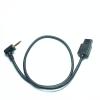
DYTDIEYINGTU MCC-P for panasonic Cable The DJI Ronin-S stabilizer Connection Cable gh4/gh5/6/7/3 s5/s5II/S5M2XS G85/G90/G95/DMC-FZ2000/1000/20/50/100 Shutter Release (MCC-P1)
£51.15
£85.25
-
 Order within to get between
 -
 Tracked Shipping on All Orders
-
 14-Day Returns
- Secure Payments
-
 24/7 Customer Support
Description
- Applicable camera models; GH2,GH3,GH4,GH5,GH5S,GH6,GH7,S1,S1H,S1R,S5,S5II,s5m2xs,G9,G95 G90,G99,G85,GX7,GX8
- In order to better operating experience, the Settings of each brand of camera are listed, please check carefully.
- The port of DJI's Ruying S stabilizer is on the left side of the express board, and the jack with RSS words is silkscreen printed
- If any of the cameras on the list are not supported, please log in to the DJI official website to update the latest version of the stabilizer software
- Functions supporting DJI RONIN-S control: Half-press focus, press to take a photo, start/stop video recording (the camera needs to be adjusted to the video recording mode)
MCC-P DJI Ronin-S for Panasonic camera shutter release cable
1) Supported control functions: Half-press focus, press to take a photo, start/stop recording (the camera needs to be adjusted to the recording mode) 2) Applicable camera models; GH2,GH3,GH4,GH5,GH5S,GH6,GH7,S1,S1H,S1R,S5,S5II,s5m2xs,G9,G95 G90,G99,G85,GX7,GX8,GXL,DMC-FZ(20/20K/20S/30/30K /30S/50/50K/50S/100/150/200/1000/2000),G1,G2,G3,G5 G6,G7,G10,GF1 3) When adjusting the for Panasonic camera to the video mode, hold down the DJI red button for 2 seconds to control the video 4) This connection cable is a shutter release connection cable, and its function is the same as the shutter release button on the camera. 5)for Panasonic camera shutter release port remote- for most camera models, it is located above the SD card at the same position 6) If it cannot be operated, please rotate the camera's plug to check if it is not inserted into the bottom properly 7) Usage of the red button on the DJI stabilizer: 01- Half-press without releasing your hand to focus the camera. Press it down and hold for 2 seconds, then take a photo with the camera. 03- Adjust the camera to the video mode, press it all the way down, and the recording will start.
Shipping and Returns
- We offer tracked shipping on all orders. Tracking information will be shared as soon as the order is dispatched.
- Please check the delivery estimate before adding a product to the cart. This is displayed for every product on the website.
- Available shipping methods and charges will be displayed at the time of checkout, depending on your exact location.
- All customers are entitled to a return window of 14 days, starting from the date of delivery of the product(s).
- Customers are advised to read our return policy for details of the return process, eligibility, refunds as well as cancellations or exchanges.
- In case of any issues or concerns about Shipping or Returns, please contact us and we will be happy to help.
DYTDIEYINGTU.
DYTDIEYINGTU MCC-P for panasonic Cable The DJI Ronin-S st...
£51.15
£85.25